Adapt the language to your project, then send it after the agreement is signed and before substantial work begins. Place this email within your client onboarding process.
Use the client onboarding checklist for the wider setup tasks and questionnaire. Record the agreed contacts, channels, and problem process in the client communication plan, then introduce the update routine with this email.
Copy the client welcome email template
Subject: How project updates will work
Hi [client name],
Before we start, I want to make project communication predictable.
I will send a short update every [day] by [time]. Each update will cover what was completed, what is next, anything I need from you, and any change to the date, cost, or agreed work.
I will send updates by email. You can also read the full update history at [private project link], so decisions do not get lost across separate threads. You do not need to create an account to open the link.
Please reply under the update on the project page when your answer concerns the project. I will send notification emails to [client email]. Tell me if another person needs access to the history before sharing the link.
For urgent issues, contact me by [method]. I treat something as urgent when [give a narrow definition]. Everything else can go in a reply and I will answer by [response expectation].
The first update will arrive on [date]. Before then, please confirm [first decision or item needed] by [date].
Thanks,
[your name]
The template is short because onboarding is not the place for your complete operating manual. It covers the habits that affect the client, while leaving internal task tracking and working methods with you.
Keep email templates in a format the client can recognise
Use email templates with a stable format so the client can find the part they need. They can scan completed work, next steps, requests, and changes without decoding a new email every week.
Do not promise a detailed report unless detail serves the project. A useful update could be under 200 words. You can attach a test result, design file, or budget when the client needs evidence, while keeping the main message readable.
Your format should also make bad weeks visible. Include changes to dates, cost, and scope as a normal section. When nothing changed, say so. When something changed, you do not have to invent a special communication process under pressure.
Choose a frequency you can keep
Weekly suits many active client projects because it gives the client a predictable view without creating daily reporting work. A two day launch may need daily updates. A slow research engagement may need an update every two weeks.
Pick the frequency from the cost of surprise, not from how often you expect impressive progress. A client waiting for a regulatory submission may need a regular note even while you wait for an outside answer. "No decision yet" can still be useful when it comes with the next expected date.
Name a day and time in the onboarding email. "I will keep you posted" sounds agreeable and defines nothing. "Every Thursday by 4pm" gives both people a standard they can notice.
Decide who reads each update
Ask who needs the update before you send the first one. The person who signed the agreement may not be the person approving designs, handling invoices, or briefing senior staff.
More recipients are not always better. A broad list can make a small question feel like a public performance, and confidential attachments may not belong with every stakeholder. Ask the client to name routine readers and explain how occasional readers will be added.
Friday stores one client email per project. Choose the person who should receive its update notifications, and agree separately who may hold the private page link.
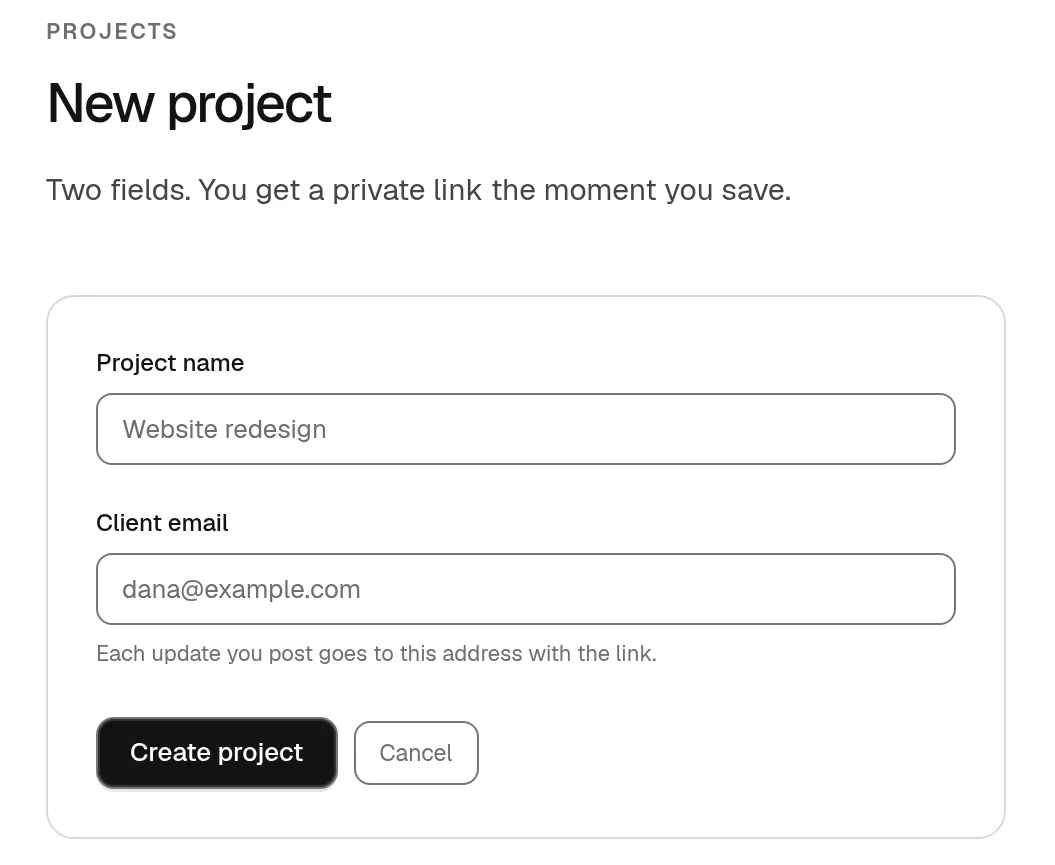
The Friday project form with a project name and client email.
Each project has a random private link. You can turn on a Friday-generated 4-digit PIN and replace the link if the people who need access change.
Keep a history from the first day
Email is convenient for delivery and poor at preserving one clean project record. Subjects change, people join late, and attachments end up in several inboxes. A project history gives both sides one ordered account of what was sent and agreed.
Say where that history lives during onboarding. Explain whether the client needs an account, what they can do there, and who can access it. Do not surprise them later with a new portal and another password.
If you use Friday, each project update queues one email for the client, who can open a private link without creating an account. You can leave the project PIN off or turn it on.
Define how replies work
Clients should know where to answer. If decisions arrive through email, text messages, calls, and comments in several tools, you will eventually lose one.
In Friday, ask the client to reply under the update on the project page. Replies to notification emails go to the freelancer but are not added to the page. Record any decision made elsewhere in the next written update so the result remains findable.
Set a realistic response expectation for yourself too. Do not imply constant availability unless the agreement pays for it and the project requires it. You might answer routine replies within one working day and define a separate route for a production outage. Use times you can keep.
Adjust the first update from their answers
The onboarding email begins an agreement rather than announcing rules. A client may need monthly reporting for finance, weekly notes for the project lead, and immediate notice for a security issue. Confirm the arrangement after they answer.
Your first update should reflect what you learned. Add the agreed readers, use the promised headings, link the history, and ask for the first concrete decision. Consistency on the first week makes the schedule credible.
A client onboarding email template can remove ambiguity about when updates arrive, where answers go, and how the client catches up. If you prefer to run that arrangement without charging for client seats, Friday provides one account per business, unlimited projects and clients, and private project histories for $49 USD/month or $490 USD/year. 30 days free. No card needed.
Use the questions to ask before the first update to agree the details. The client update template and weekly writing guide give you the format for later notes.